
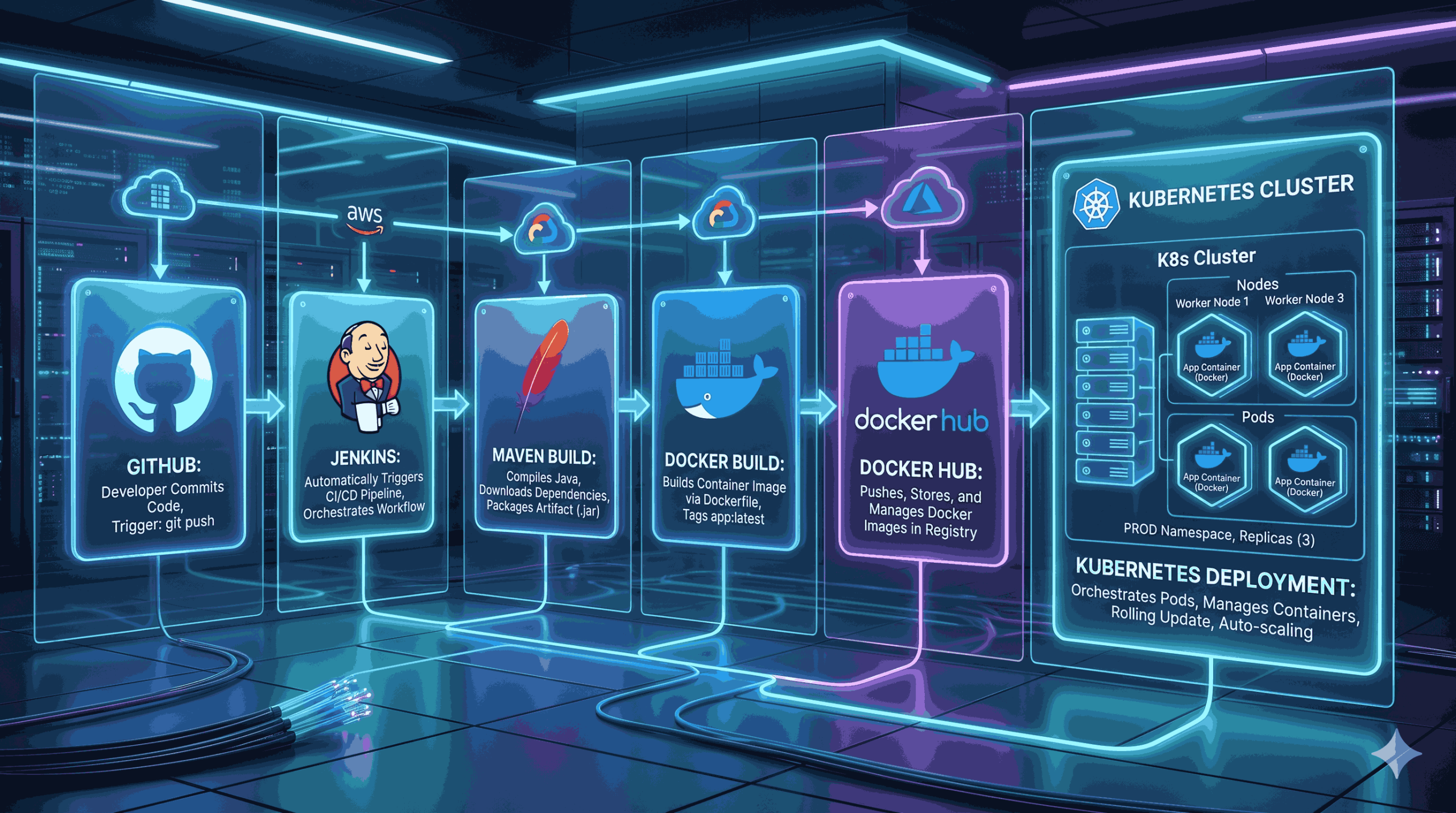
Automating software deployments with Jenkins (CI/CD) is essential in modern tech. As a DevOps Engineer, my job is to ensure code moves from a laptop to a live server automatically and without errors.
We built an automated pipeline for the Spring Petclinic app. You will learn how to connect:
- Jenkins for automation
- Maven for building
- Docker for containerization
- Kubernetes for deployment
Prerequisites
- Before starting, ensure you have the following tools configured:
- GitHub Account: To host the springboot-docker-kubernetes-cicd repository.
- Jenkins Server: With Git, Docker, and Kubernetes CLI plugins installed.
- Docker Hub Account: To store your container images.
- Kubernetes Cluster: (Minikube, K3s, or a cloud provider like AWS EKS).
- Build Tools: Java and Maven installed on your Jenkins agent.
ALSO READ:
- The Ultimate Guide to Kubernetes Architecture: A Step-by-Step Breakdown 2026
- Linux Server Health Checks Dashboard: Build a Powerful Monitoring Tool 2026
- AWS S3 Backups with This Efficient Shell Script
- Bash Brackets Explained in Simple Words (With 8 Examples)
Click here to go to the GitHub repos link
The CI/CD Process Overview
The pipeline follows a logical, five-stage process:
- Fetch: Pull the latest code from GitHub.
- Build: Use Maven to compile and package the Spring Boot .jar file.
- Containerize: Build a Docker image containing the application.
- Push: Upload the image to Docker Hub for centralized access.
- Deploy: Update the Kubernetes cluster with the new image.
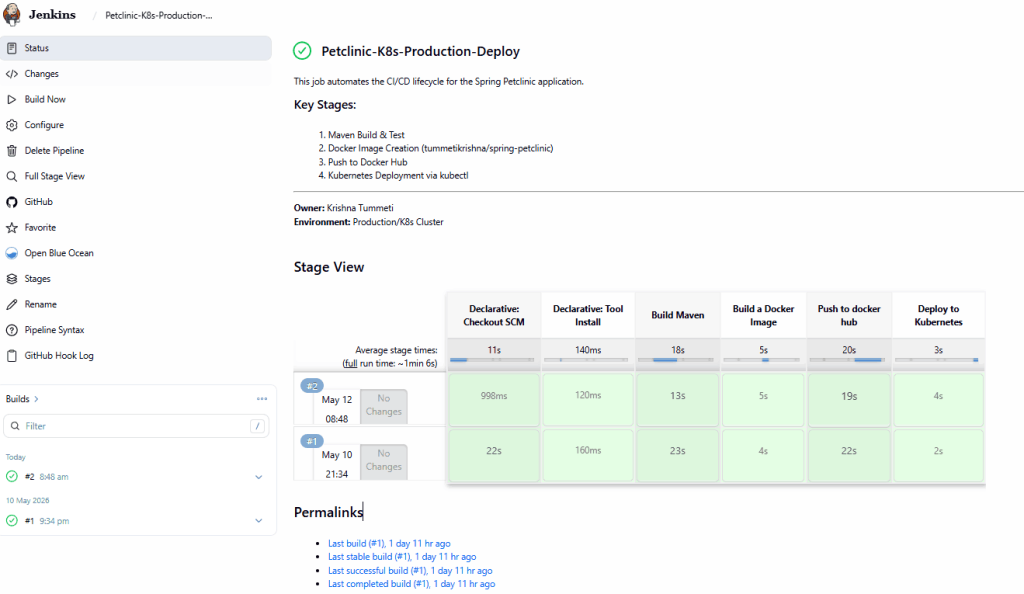
Step-by-Step Implementation Guide
Step 1: Source Code Management (GitHub)
The project starts with a push to GitHub. My repository includes the Spring Boot source code, a Dockerfile for containerization, and a deploymentservice.yaml file for Kubernetes orchestration.
Step 2: Automated Build with Maven
Once triggered, Jenkins runs `mvn clean install`. This step is crucial as it runs unit tests and compiles the code. If a single test fails, the pipeline stops, ensuring that “broken” code never reaches your users.
Step 3: Creating the Docker Image
After a successful build, Jenkins uses the Dockerfile to create a lightweight container image. I use an optimized OpenJDK base image to ensure the container is fast and secure.
Step 4: Secure Image Registry (Docker Hub)
The pipeline logs into Docker Hub using encrypted Jenkins credentials. The image is tagged (e.g., tummetikrishna/spring-petclinic:latest) and pushed to the registry, making it accessible to the Kubernetes cluster.
Step 5: Kubernetes Deployment & Verification
Finally, the pipeline connects to the Kubernetes cluster. It executes kubectl apply -f deploymentservice.yaml, which triggers a rolling update. Kubernetes replaces the old pods with new ones, ensuring the application remains online during the update.